Snare Legio#
Physical-modeling snare voice
Overview#
Snare Legio is one of the most accurate snare recreations in the format. It takes inspration from another of our physical-modeling voices, Marimba Legio, and emulates the actual behavior of a snare drum. The result is an expressive and unique snare voice that mixes well with other drums while still standing on its own. Snare Legio is also an excellent synth voice when paired with a pitch sequencer. Grab Snare Legio when you're not sure if you're feeling percussive or melodic and see where it takes you.
- Type: Snare voice
- Size: 6 HP
- Depth: 1.5 inches
- Power: 2x5 Eurorack
- +12 V:
140mA - -12 V:
22mA
Etymology#
Snare -- from English: "A hidden trap”
Legio -- from Latin: “legion, army”
“IT'S A TRAP. A LOT OF TRAPS.”
Color code#
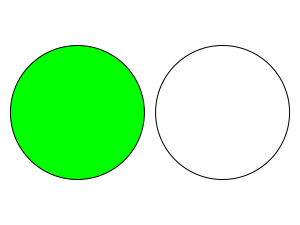
On boot, the Legio's LEDs will shine with this color pattern to indicate that it is running the current Snare firmware:
Power#
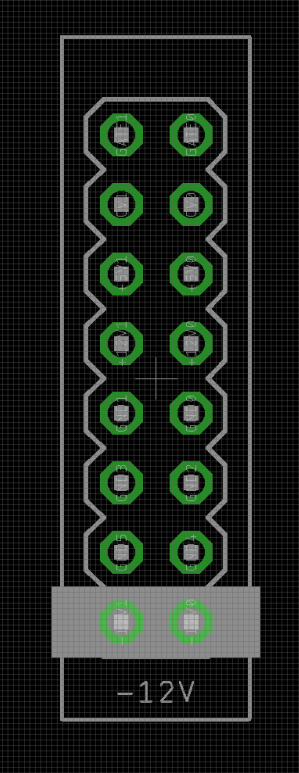
To power your Noise Engineering module, turn off your case. Plug one end of your ribbon cable into your power board so that the red stripe on the ribbon cable is aligned to the side that says -12 V and each pin on the power header is plugged into the connector on the ribbon. Make sure no pins are overhanging the connector! If they are, unplug it and realign.
Line up the red stripe on the ribbon cable so that it matches the white stripe and/or -12 V indication on the board and plug in the connector.
Screw your module into your case before powering on the module. You risk bumping the module's PCB against something metallic and damaging it if it's not properly secured when powered on.
You should be good to go if you followed these instructions. Now go make some noise!
Noise Engineering modules are reverse protected. If you accidentally installed it with the red stripe up, simply remove the power and place it correctly.
A final note. Some modules have other headers -- they may have a different number of pins or may say "not power". In general, unless a manual tells you otherwise, do not connect those to power.
Input & output voltages#
Legio’s CV-modulation inputs expect signals from 0v to +5v.
The Pitch input’s range is -2v to +5v.
The Hit input responds to a rising edge around +1.6v.
The audio inputs are AC coupled and respond to any Eurorack audio signals.
The audio output can reach up to 16v peak-to-peak.
Interface#
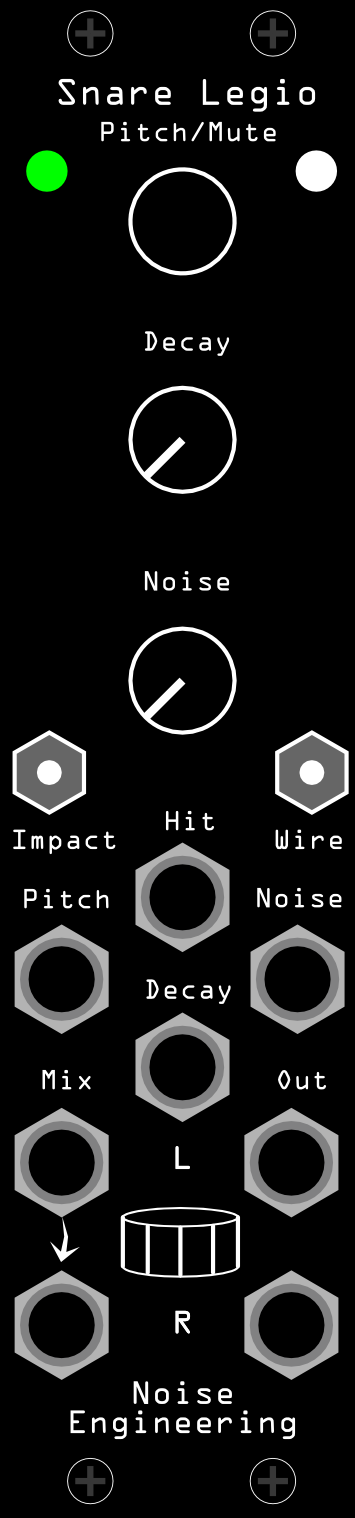
- Pitch (encoder+CV input)
- Sets the pitch of the voice.
- Tap to mute/unmute the voice.
- Decay (potentiometer+CV input)
- Sets the decay time for the snare body.
- Noise (potentiometer+CV input)
- Sets the decay time for the snare wires.
- Impact (switch)
- Sets the intensity of the snare hit.
- Wire (switch)
- Sets the tension of the snare wires.
- Hit (trigger input)
- Triggers the drum voice.
- Mix L/R
- Audio inputs. Audio here is mixed with the drum voice and passed through to the outputs. The L jack is normaled to the R jack if R is left unpatched.
- Out L/Out R
- Audio outputs.
Patch tutorial#
Patch a trigger pattern to the Hit input. Tune the voice to the rest of your patch.
The body of the snare can be shaped with Decay and Impact, and the tail with Noise and Wire. Since the voice is based around physical modeling, frequency also plays a big part in its timbre.
Note
If using multiple Legio drum voices, they can be chained together without an external mixer. Just patch the output of one to the input of the next.
However, order matters: Kick will duck all the percussion voices that come before it. For ultimate impact, put Kick at the end of the chain; or, if some drums are more important, put them after Kick so they aren't ducked out of the way.
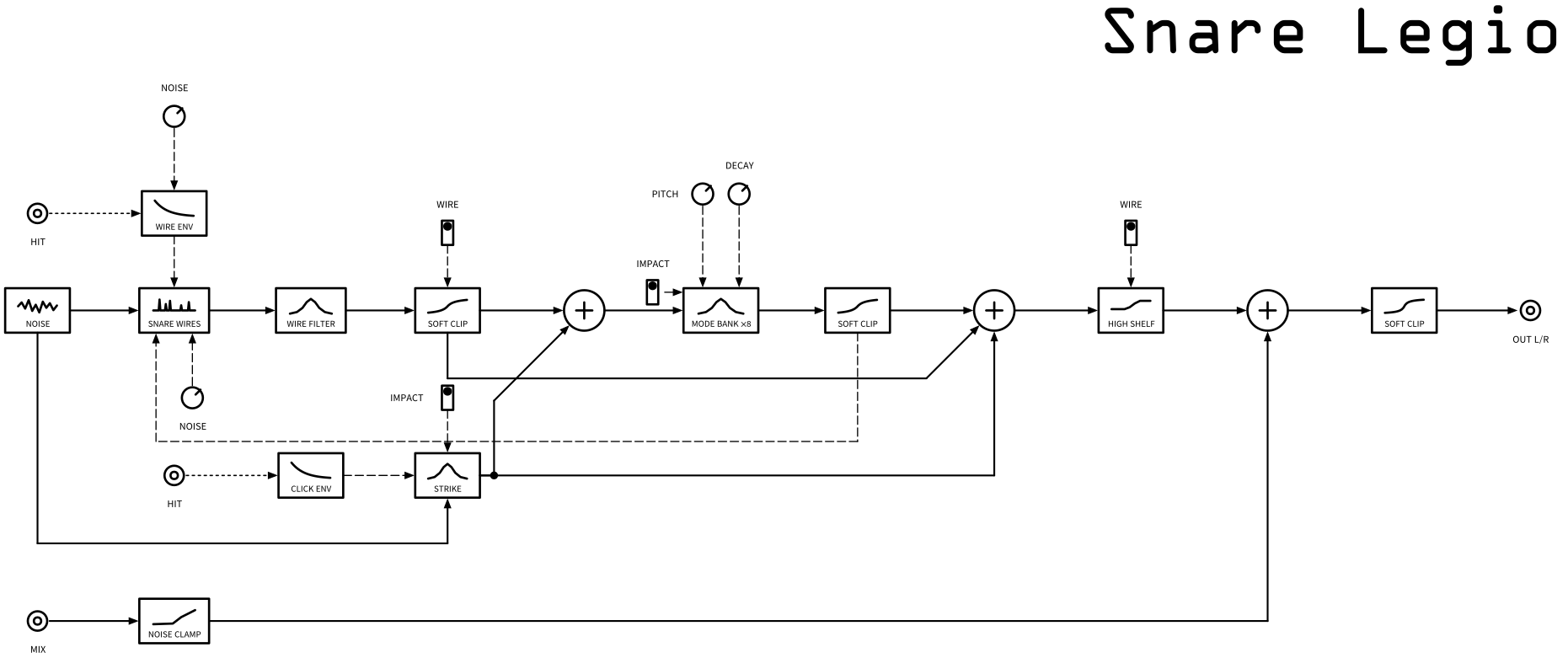
Signal flow#
Warranty#
We will repair or replace (at our discretion) any product that we manufactured for one year after initial purchase as long as we are able to get the parts to do so. This warranty does not apply to normal wear and tear, including art/panel wear, or any products that have been modified, abused, or misused. Our warranty is limited to manufacturing defects.
Warranty repairs/replacements are free. Repairs due to normal wear, user modification, or other damage are charged at an affordable rate. Customers are responsible for the cost of shipping to Noise Engineering technicians for repair.
All returns must be coordinated through Noise Engineering; returns without a Return Authorization will be refused and returned to sender.
For immediate issues with new modules, please contact your dealer for a replacement. Otherwise, please contact us if you think one of your modules needs a repair.
Design Notes#
Snare Legio is the result of months of iteration, attempting to create a snare voice that actually captured the snare desires of everyone at Noise Engineering. The result was an incredible synth voice that, as with any good compromise, left all of use feeling somewhat upset.
If you're wondering about the more pronounceable / recognizeable names for many of this firmware release, we'll just say that a few things went into these. First, they had to be short enough to fit on the overlays. Second, we wanted puns where we could because we have terrible senses of humor. Third, when trying to come up with names for 23 firmwares that all four of us could agree on, sometimes you go with the low-hanging fruit.
All kidding aside, we realized that we were dropping a lot of firmwares at once. We hoped that making a few names imminently recognizeable would help folks parse what some of them did, even if it kind of breaks with NE tradition.
Special thanks#
- Enthusiastic Electrons
- Everett Dolgner
- Frequency Divide
- itsMasterIll
- Ozon
- starthief