Granulita Versio#
Granular chord resynthesizer and shimmer verb
Overview#
Granulita Versio is a unique granular processor designed to create chords and harmonies out of monophonic audio sources. Patch in a synth voice, some samples, or even a pure oscillator and out comes beautiful, sometimes ominous, harmonies. Add in some shimmering reverb and experiment with frozen textures or externally triggered grains – Granulita is a simple-to-use paraphonic playground.
- Type: Granular chord resynthesizer/DSP platform
- Size: 10HP
- Depth: 1.5 Inches
Etymology#
Granulita -- from Esperanto: "granulated"
Versio -- from Latin: "versatile"
"Granulated Versatility"
Color code#
On boot, the Versio's LEDs will shine with this color pattern to indicate that it is running the current Granulita Versio firmware:

Power#
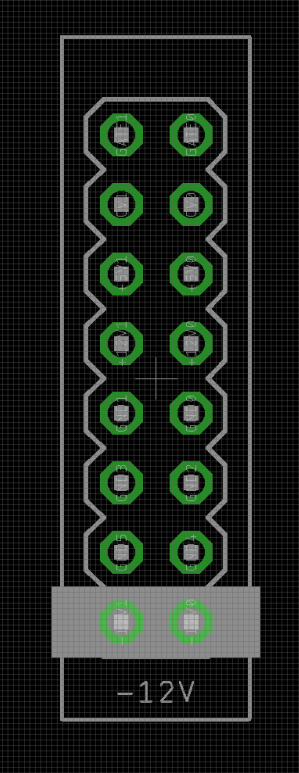
To power your Noise Engineering module, turn off your case. Plug one end of your ribbon cable into your power board so that the red stripe on the ribbon cable is aligned to the side that says -12 V and each pin on the power header is plugged into the connector on the ribbon. Make sure no pins are overhanging the connector! If they are, unplug it and realign.
Line up the red stripe on the ribbon cable so that it matches the white stripe and/or -12 V indication on the board and plug in the connector.
Screw your module into your case before powering on the module. You risk bumping the module's PCB against something metallic and damaging it if it's not properly secured when powered on.
You should be good to go if you followed these instructions. Now go make some noise!
Noise Engineering modules are reverse protected. If you accidentally installed it with the red stripe up, simply remove the power and place it correctly.
A final note. Some modules have other headers -- they may have a different number of pins or may say "not power". In general, unless a manual tells you otherwise, do not connect those to power.
Input & output voltages#
All CV inputs expect 0 V to 5 V. All pots act as offsets and sum with the input CV. The Hit input responds to signals above +2 V. The audio inputs clip around 16 V peak to peak.
Interface#

- Blend
- Dry/wet blend.
- Pitch
- Unquantized grain pitch offset, from -1 octave to +1 octave.
- Chord
- Selects the chord created by the grains. The LEDs display the current Chord and Voice settings, explained in the Chord display section below.
- Voice
- Selects which note in the chord tracks the input.
- Verb
- Shimmering reverb. The first half of the parameter increases the reverb decay time. The second half of the parameter adds shimmering overtones to the tail. Past 3 o’clock, the reverb rings out infinitely.
- Count
- Sets the grain count, from
0to32. If set to0, no grains will be played. - Length
- Sets the grain length, from
16 millisecondsto4 seconds. - REV/BTH/FWD
- Sets grain playback direction.
- REV: Grains are played backwards.
- BTH: Grains are randomly played backwards and forwards.
- FWD: Grains are played forwards.
- FRZ/SYNC/TRIG
- Sets the behavior of the Hit button and gate input.
- FRZ: Grains are frozen while the Hit button is pressed or a high gate is present at the Hit input.
- SYNC: Grain time can be synced to an external clock or tap tempo. Hold Hit for a few seconds to reset the clock.
- TRIG : Grain playback is triggered only from external triggers or the Hit button being pressed.
Note
Sync mode is more complex than the clock sync found in, for example, a clocked delay. Grain length and firing aren't locked to the clock period, and the incoming clock becomes a scalar to the grain window time. If you change the incoming clock rate, the grain timing will also change, but it won't be hard locked to the external clock's tempo. This allows for creative patching effects, like grains being slightly off grid but still following a tempo change in a patch.
Sync mode exists in a realm between unclocked timing and Trig mode. For precisely clocked grains, try using Trig mode with an external clock signal.
Chord display#
The current chord setting is selected with the Chord and Voice parameters. Voice selects which note in the chord tracks the input, and Chord selects what intervals are generated.
The possible chords are as follows:

The LEDs reflect the intervals in the chord. The note selected by Voice will be displayed white, and the other notes will be displayed as numerical offsets from that note.
1 ◼ 2 ◼ 3 ◼ 4 ◼ 5 ◼ 6 ◼ 7 ◼ 8 ◼ 9 ◼ 10 ◼ 11 ◼ 12 ◼
For example, if Voice is set to maximum (tracking the lowest note) and Chord is set to augmented major seventh, the color code would display as the following:
1 ◼ 5 ◼ 9 ◼ 12 ◼
Patch tutorial#
Set Blend, Pitch, Count, and Length to noon, and Chord, Voice, and Verb fully counterclockwise. Set the top switch to the center position, and the bottom switch to the left position.
Patch a simple waveform – saws and squares work great – to the input, and use the Chord and Voice parameters to change the generated intervals.
Adjust the Count and Length parameters to taste.
Add in some atmosphere with the Verb parameter, and try slowly adjusting Pitch to create dramatic transpositions or atonal effects.
Patch a clock to Hit and set the bottom switch to the middle position for clocked playback.
Or, patch a trigger sequence to Hit, set the bottom switch to the right position, and set Blend fully clockwise for triggered grain playback.
Signal flow#
Granulita Versio features a relatively simple signal path, with a majority of the stages in its signal flow dedicated to keeping levels in check.

Grains use the following signal path:

Design notes#
Granulita started life as a granular processing plugin that never really made it past the prototype phase. Stephen learned a lot from playing with that plugin, and ported a subset of its features to the Versio hardware. The design focuses in on the key features of the now-defunct plugin, with parameters designed to make it easy to get interesting granular results with minimal effort.
Granulita was one of a few new granular firmwares prototyped on the Versio hardware, but beat out the other design concepts due to its uniqueness in the modular realm, and the pure joy we found while patching it.
Warranty#
We will repair or replace (at our discretion) any product that we manufactured as long as we are in business and are able to get the parts to do so. We aim to support modules that have been discontinued for as long as possible. This warranty does not apply to normal wear and tear, including art/panel wear, or any products that have been modified, abused, or misused. Our warranty is limited to manufacturing defects.
Warranty repairs/replacements are free. Repairs due to user modification or other damage are charged at an affordable rate. Customers are responsible for the cost of shipping to Noise Engineering for repair.
All returns must be coordinated through Noise Engineering; returns without a Return Authorization will be refused and returned to sender.
Please contact us if you think one of your modules needs a repair.
Special thanks#
- starthief
- Tom Geffray